

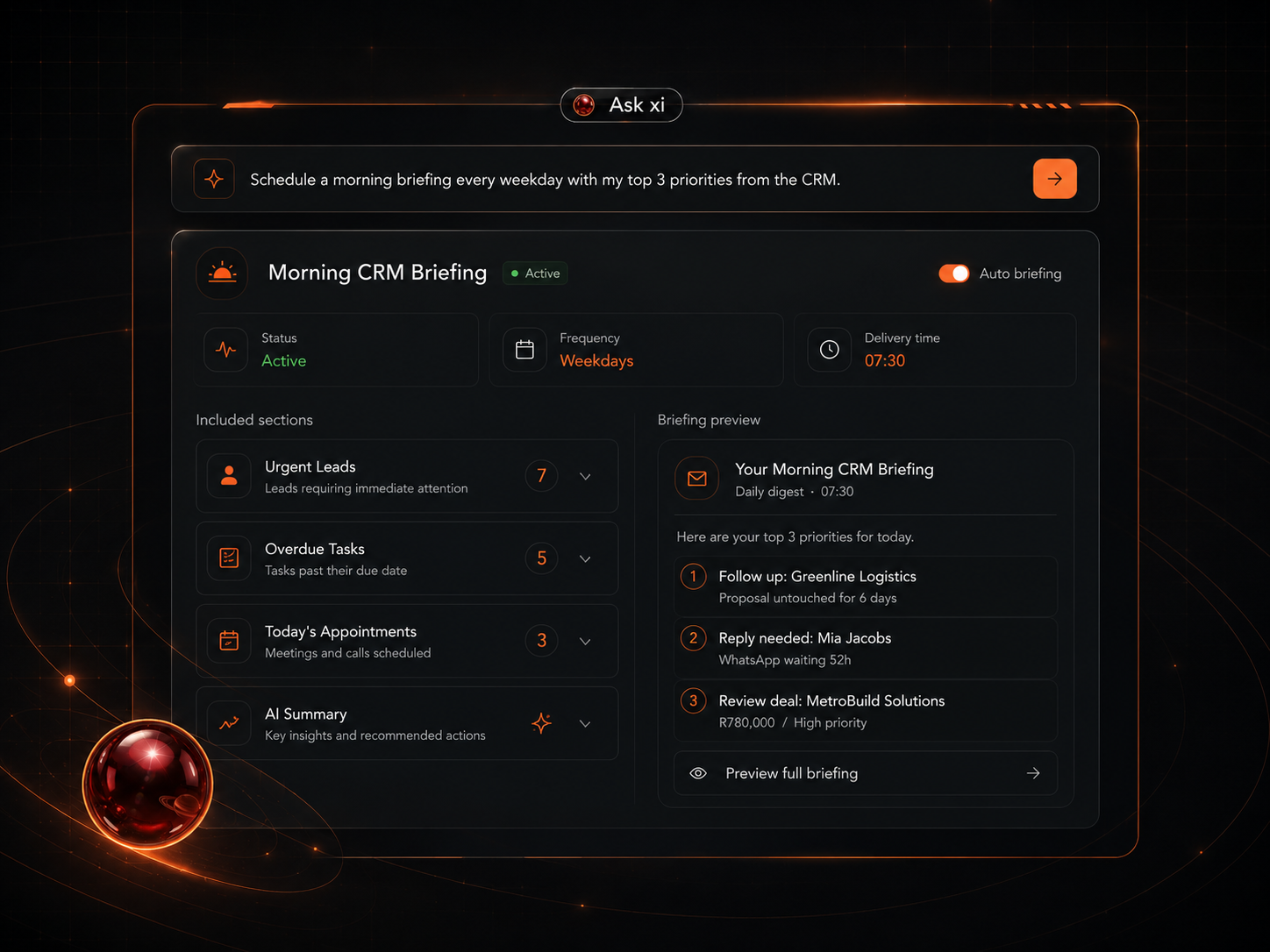
140 example screens showing what your business operating layer could see, organise and move.
These examples show what can become possible when CRM, follow-up, automations, reporting, AI agents, content, admin and client journey systems are structured properly.
Not a fixed menu · Not an instant promise · A way to imagine what could apply to your business.
No obligation. The call is only to understand what is viable, what should come first and what would be required.
What you are looking at
A visual map of what a better business operating layer can look like.
The ORBITxi Proof Library is a visual map of what a better business operating layer can look like.
The screenshots are examples of questions, instructions, dashboards, workflows, agents, reports, follow-up paths and setup screens that can become possible once the right CRM, data, automations and AI layer are built around the business.
These examples are here to help you see possibilities before choosing a path.
How to use it
How to use the library
Browse the system layers
Move through the 14 sections to see where your business may be leaking signal, context or next steps.
Notice what feels relevant
You do not need every layer. The useful part is identifying what your business needs first.
Book a navigation call
If the examples resonate, book a short call to see what is realistic for your current tools, team, offer and lead flow.
14 System Layers
The operating layer, one section at a time
Move through each system layer. Notice what feels relevant to your business right now.
Layer 1 of 14
Risk Radar
Find the leaks before they cost you.
Overdue follow-ups, no-reply conversations, stalled deals and weekly priorities.
Useful for
Business owners, founders, operators and sales teams who need to see what is slipping.
See where your follow-up is leaking.
Layer 2 of 14
Revenue Cockpit
See where the money is, what changed and what needs attention.
Pipeline value, closed deals, invoices, payments and campaign performance.
Useful for
Owners, sales leaders and operators who need clearer revenue visibility.
See where the money is getting stuck.
Layer 3 of 14
Action Console
Don’t just see the work. Move it.
Tasks, tags, notes, reminders, assignments and CRM updates from simple instructions.
Useful for
Operators, admins, sales teams and founders who want less manual CRM clicking.
See what actions your system could support.
Layer 4 of 14
Automation Studio
Build the operating logic behind the business.
Workflows, bots, voice agents, lead intake, reminders and knowledge-base agents.
Useful for
AI-curious owners, agencies, operators and teams exploring automation.
See which automations should come first.
Layer 5 of 14
Manager Cockpit
Run the team with better visibility.
Workload, permissions, objections, call logs, overdue tasks and team follow-up.
Useful for
Owners, sales managers and team leaders.
See what your team should be able to see.
Layer 6 of 14
Speed-to-Lead Hub
Stop losing enquiries after they ask.
Examples across WhatsApp, DMs, SMS, missed calls, chat widgets and human handoff.
Useful for
Service businesses, local businesses and sales teams with high enquiry volume.
See how fast your response path could become.
Layer 7 of 14
Workflow Intelligence Studio
Your CRM should know more than a name and email.
Fields, trigger links, variables, sentiment, extraction and personalisation.
Useful for
Operators, CRM admins, implementers and technical buyers.
Map the context your CRM is missing.
Layer 8 of 14
Commercial Admin Desk
Structure the admin behind the offer.
Invoices, products, proposals, payments, coupons, fulfilment, knowledge base and FAQs.
Useful for
Service providers, consultants, agencies and admin-heavy businesses.
See what your back office could organise.
Layer 9 of 14
Marketing Studio
Turn business context into marketing assets.
Social posts, content plans, funnels, landing copy, nurture emails and outreach.
Useful for
Founders, marketers, consultants, creators and service businesses.
See how your offer could become a campaign system.
Layer 10 of 14
Content + Brand Lab
Make AI content sound like the business.
Blogs, SEO, case studies, brand boards, voice guides, bios, headlines and scripts.
Useful for
Creators, consultants, founders, agencies and brand-led businesses.
Build the brand context behind your AI.
Layer 11 of 14
Client Success Hub
The system should not stop after the sale.
Reviews, feedback, courses, forms, surveys, quizzes and completion triggers.
Useful for
Service businesses, coaches, course creators, agencies and client success teams.
See how your client journey could be structured.
Layer 12 of 14
Setup + Compliance Console
The boring setup is what makes the system reliable.
Calendars, inbox checks, lead form sync, DM routing, sending domains, DNS and SMS compliance.
Useful for
Operators, admins, agencies and implementation-conscious businesses.
See what needs to be connected before scaling.
Layer 13 of 14
Custom Data + Flow Builder
Go beyond a flat contact list.
Custom objects, project records, associations, snapshots, WhatsApp flows and chat openers.
Useful for
System builders, agencies, operators and structured businesses.
See how your business data could be structured.
Layer 14 of 14
Advanced Assist Pack
A deeper look at the operating layer.
Webinar follow-up, bot training, voice scripts, retainer check-ins, lead scoring, unsubscribe reports and warm-intent follow-up.
Useful for
High-intent prospects who want to see deeper proof and strategic follow-up.
See what advanced support could look like.
Full gallery
Browse all 140 examples
Filter by category, or search by title, tag or use case.
140 of 140 examples
Clarity
What this is — and what it is not
This is
- A visual proof library.
- A way to imagine what your system could make visible.
- A map of possible operating layers.
- A starting point for a navigation conversation.
- A way to identify what could matter most first.
This is not
- A fixed product menu.
- A promise that every feature should be built.
- An instant setup.
- A guarantee of leads, revenue or bookings.
- A replacement for proper review, setup and implementation.
FAQ